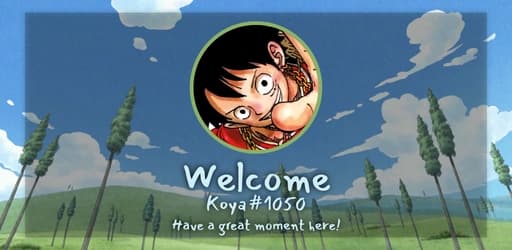
Looking for a Discord welcome bot that does more than print a generic message? Build greeting messages with embeds, send a DM on join, autoassign roles, and announce when members leave or get banned. The basic setup is free, with Premium unlocking advanced card layouts, custom fonts and the layered canvas builder.
Greet members on join, leave, ban and Nitro boost events
Send welcome messages, embeds or a DM in any channel
Auto-role new members, with bot/human filters and optional delay
Custom-background welcome cards on the free tier (Classic layout)
Premium unlocks Left/Right/Text layouts, custom fonts, square avatars, overlay opacity and the advanced canvas builder
Configure separate messages for member join, member leave, member ban and Nitro boost. Each event has its own channel, embed, optional welcome card and optional DM, so the same dashboard covers every moment of a member’s journey.
Welcome cards from basic to advanced
The basic builder lets you swap the background, choose the layout (avatar position is set by the Classic, Left or Right layout), pick the avatar shape, and write a title and subtitle. The advanced builder (Premium) adds layered text, shapes (circle, rect, polygon, star), emoji and image layers, rotation and z-order, so your card looks exactly the way you want.
Auto-roles with filters that actually work
Add or remove roles automatically when a member joins. Choose whether to apply rules to humans, bots or everyone, and set a delay so roles land after Discord membership screening. Combine it with a welcome DM to onboard new members instantly.
FAQ
Is this welcome bot free?
Yes. The Classic welcome card layout, plain message and embed greetings, auto-roles and welcome DMs are all free. Premium unlocks the Left/Right/Text layouts, custom fonts, square avatars, overlay opacity and the advanced canvas builder with layered elements.
Can I use a custom image as the welcome card background?
Yes, on the free tier. Upload your own background image or pick one from the gallery, write your title and subtitle, and the card is generated automatically. Premium adds the Left/Right/Text layouts (the Free tier uses the Classic layout), custom fonts, square avatars, overlay opacity and the advanced layered canvas builder.
Does it support auto-roles for new members?
Yes. You can assign or remove roles when a member joins, with optional delay, a humans-only or bots-only filter, and full compatibility with Discord’s membership screening.
How do I set up welcome messages on my Discord server?
Invite Koya, open the dashboard, choose the join channel, build your message or card, and save. The full setup takes less than two minutes.